_edited.png)
Why I Created the Website Manager’s Sanity Saver

Updated: 3 days ago
“Can you just update the website?”
It sounds harmless. A quick swap. A small edit. A five-minute task.
Sometimes it is. But sometimes that one sentence arrives with a missing photo, three versions of the copy, a vague deadline, and final approval that somehow needs to happen yesterday.
If you manage a website, you know the real work often starts before you ever log in. You have to figure out what is changing, where it belongs, who owns the information, what files are missing, and whether the update is actually ready to publish.
That is why I created the Website Manager’s Sanity Saver.
Not because website updates are impossible. Because they get messy when there is no clear place to capture the request, sort the details, and protect the person responsible for making the change.
The request is rarely the whole request
A website update sounds simple when someone says it out loud.
“Can you add this event?”
“Can you change the team page?”
“Can you post this announcement?”
“Can you swap the image on the homepage?”
The trouble is that each request has hidden questions attached to it.
For an event, you need the date, time, location, registration link, image, contact person, and the date it should come down. For a team page update, you need the correct name, title, bio, headshot, and approval from the right person. For an announcement, you need to know whether it belongs on the homepage, blog, news section, email, or all of the above.
The person asking often sees the final click. The website manager sees the trail of decisions behind it.
That gap is where stress builds.
The Website Manager’s Sanity Saver came from wanting a better way to handle that gap. I wanted something practical, not complicated. A place to turn “Can you just…” into a clear, trackable request.
I wanted to stop chasing missing pieces
The most frustrating part of website management is not always the update itself. It is the chasing.
Chasing the final copy.
Chasing the right image.
Chasing the link that was supposed to be included.
Chasing approval from someone who did not know they were the approver.
A small update can sit half-done for days because one detail is missing. Meanwhile, it still lives in your head. You remember that the photo has not arrived. You remember that the headline changed twice. You remember that someone said, “Let me check with the team,” but never followed up.
That mental load is real.
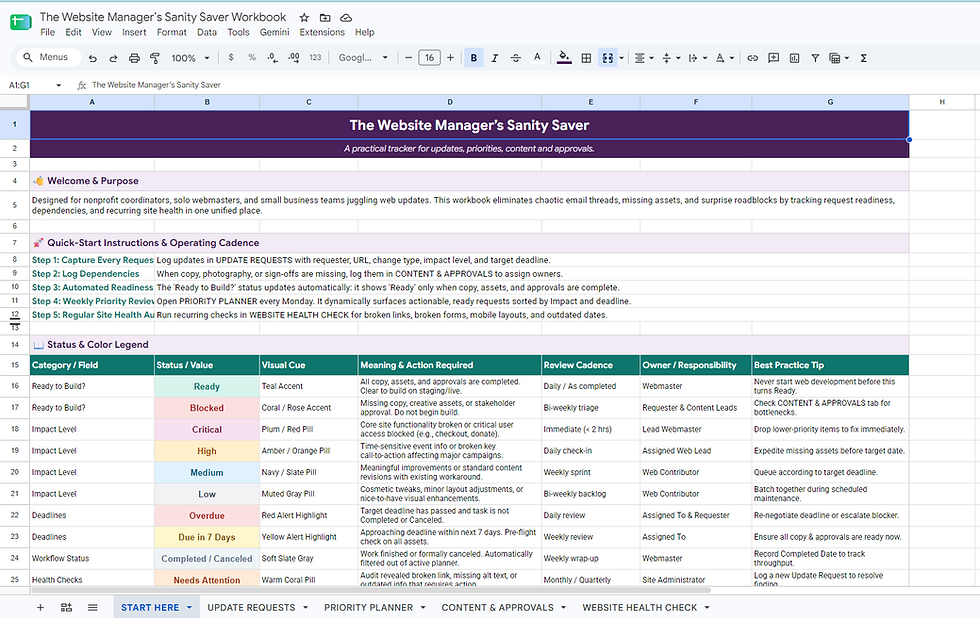
I created the Website Manager’s Sanity Saver to get those details out of someone’s brain and into a clear system. It gives each update a place to live, with the information needed to move it from “requested” to “ready” to “published.”
At its simplest, a request needs answers to questions like these:
What page or section needs to change?
What exactly should be added, removed, or edited?
Who is providing the content?
Are the image, copy, and links final?
Who needs to approve it?
When should it go live?
When should it be reviewed or removed?
Those questions may seem basic, but they prevent a lot of back-and-forth.
A clear process protects the website and the manager
Websites are public. That means tiny mistakes can become very visible.
A typo in an internal document is annoying. A typo on the homepage can get screenshots. An outdated date can confuse customers. A broken link can cost signups. An old staff bio can make an organization look careless.
That does not mean every update needs a long approval chain. It means every update needs a clear path.
A good process helps protect three things:
The person making the update
They are not relying on memory, scattered emails, or hallway conversations.
The person requesting the update
They know what to provide and when to expect the change.
The website itself
It stays accurate, current, and easier to manage over time.
The point is not to make website updates harder. The point is to make them less chaotic.
A simple website update tracker can make a big difference because it shows what is requested, what is waiting, what is approved, and what is done. That visibility lowers the number of “Where are we on this?” messages because the answer is already written down.
The Sanity Saver is built for real life
I did not want to create something that only works when everyone follows the process perfectly. That is not how website work happens.
Requests arrive through email, messages, shared documents, meetings, and quick comments made while someone is walking out the door. Priorities shift. Content changes. People forget attachments. Deadlines move.
So the Website Manager’s Sanity Saver is built around the reality of website work, not an ideal version of it.
It helps collect the request, clarify what is missing, and keep the status visible. It also creates a gentle boundary around what “ready to update” means.
That boundary matters.
If the copy is still being debated, it is not ready.
If the photo has not been chosen, it is not ready.
If the approval person has not reviewed it, it is not ready.
If no one knows where it belongs, it is not ready.
That clarity can feel like a relief. It gives the website manager a way to say, “I can take care of this once these pieces are complete,” without sounding difficult or unhelpful.

The goal is less panic and more control
Website management often looks invisible when it is done well. Pages are current. Links work. Announcements appear on time. Old content disappears when it should.
But staying on top of that takes care, attention, and a process that can survive busy weeks.
That is the real reason I created the Website Manager’s Sanity Saver. I wanted to make website updates feel less like a pile of loose threads and more like work that can be calmly sorted, tracked, and finished.
The tool is for the person who wants to be helpful but needs the details first. The person who keeps the website running while juggling requests from different directions. The person who has heard “Can you just update the website?” and immediately thought, “Yes, but I need a few things before I can.”
A clear system will not stop last-minute requests from happening. It will not make missing photos magically appear. It will not make every draft final on the first try.
But it can give every request a home, every missing piece a name, and every update a better chance of getting published without the scramble.
That is the sanity saver. Not a fancy process. Just a calmer way to manage the work that keeps a website alive.
Get Your Free Copy

Click Get the Free Template below to open the workbook in Google Sheets. Sign in to your Google account, then select File → Make a copy to save your own editable version.
Prefer Excel? Choose File → Download → Microsoft Excel (.xlsx). Some formatting or features may work differently in Excel.
[Get the Free Template → Website Manager's Sanity Saver]


Comments